Using the clock as an alarm, Setting the alarm clock – Инструкция по эксплуатации Beko OIE 25500 X
Страница 23
Внимание! Текст в этом документе был распознан автоматически. Для просмотра оригинальной страницы Вы можете воспользоваться режимом "Оригинал".
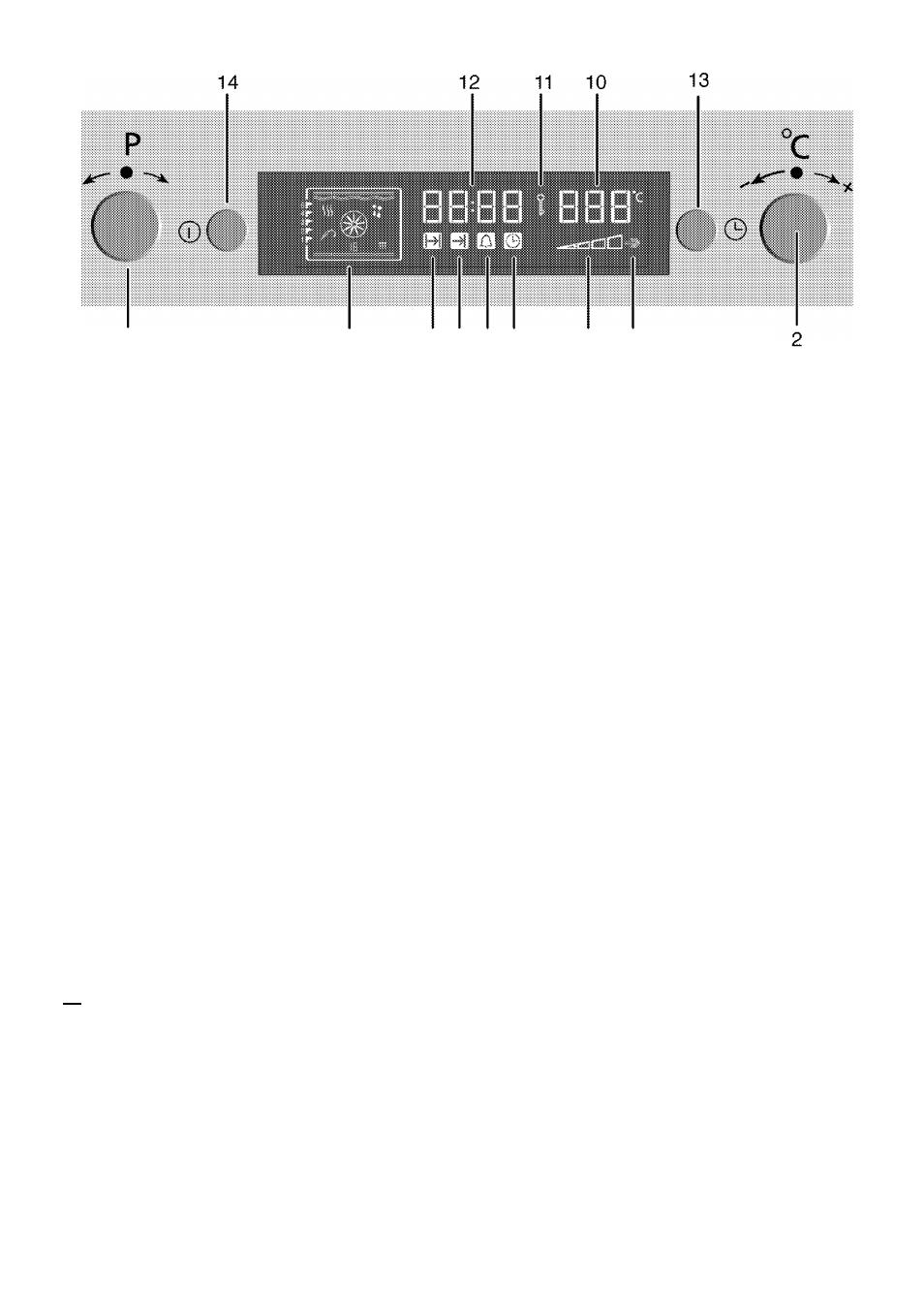
1
3
1
Program selection knob
2
Temperature-time
increasing/decreasing knob
3
Function display
4
Cooking time symbol
5
Cooking end time symbol
6
Alarm period symbol
7
Current time symbol
8
Inner oven temperature symbol
9
Booster position
10
Temperature display
11
Keylock symbol
12
Current time display
13
Menu button
14
ON/OFF button
Using the clock as an alarm
Alarm clock does not have any effect
on the oven functions. It is used as a
warning.
For example, you can use alarm clock
to warn you for turning the dish in the
oven round in a certain time.
m The maximum alarm time can be
23 hours and 59 minutes.
4 5 6 7
8
9
Setting the alarm clock
1. Press button
'13'
with short
intervals until the alarm symbol '6'
becomes active.
2. Adjust it by siightly twisting the
button 2 towards or
» Alarm symbol remains iit after
adjusting the aiarm time.
3. After the aiarm time is finished,
aiarm symboi wiii start flashing and
an aiarm signai is heard.
4. You can stop the aiarm by pressing
any button.
In order to cancel set alarm time;
1. To reset the alarm time, press
button
'13'
to activate the aiarm
symboi
(6).
2. Adjust it by siightly twisting the
button
'2'
towards untii
"
00
:
00
"
is displayed.
m
Alarm clock can be used either
the oven is operating or not
operating.
23 I EN