Connecting iaudio and installing jetshell – Инструкция по эксплуатации COWON iAUDIO M3
Страница 36
iAUDIO M3
36
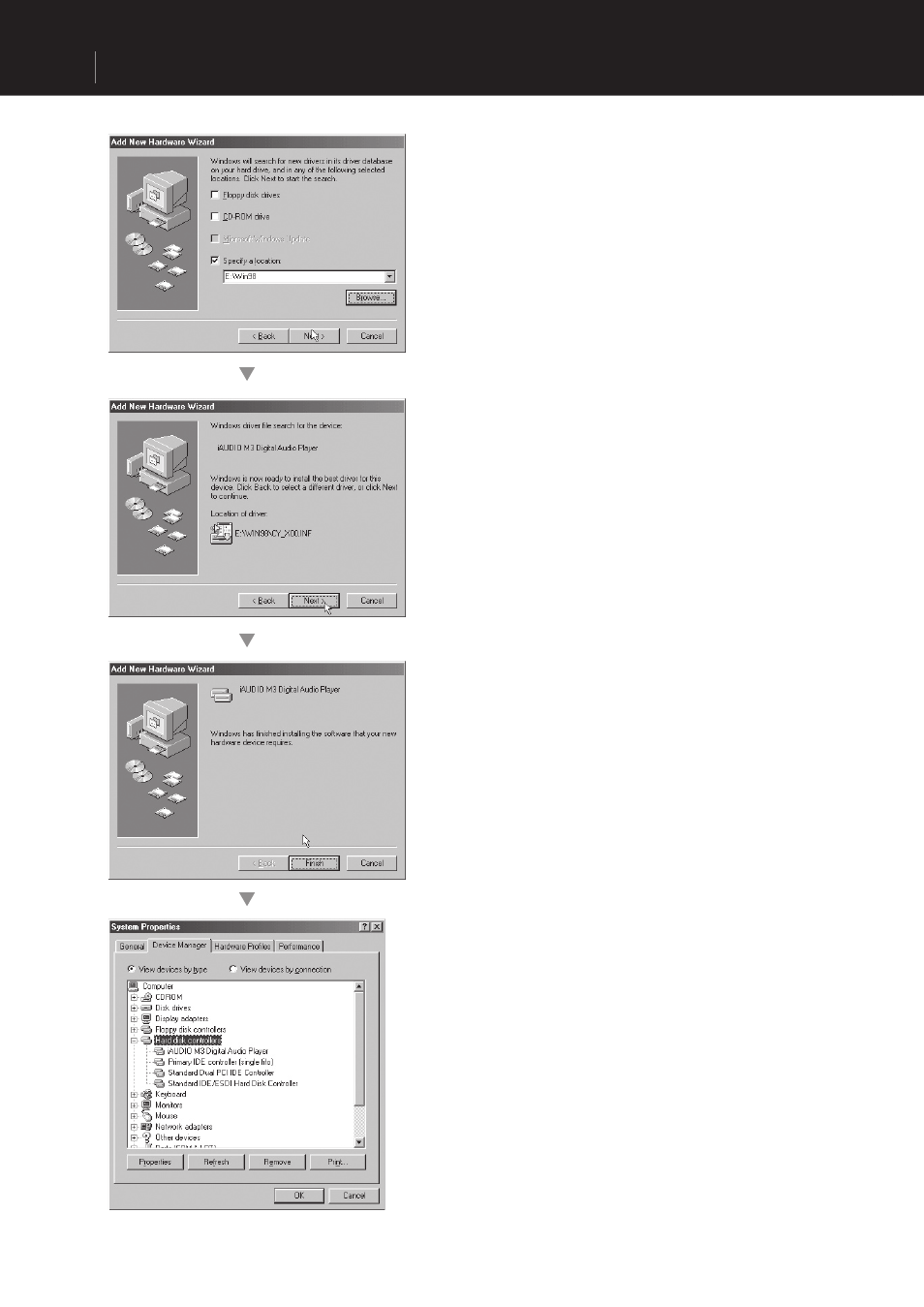
4. Check "Specify a location" and click on the
[Browse] button.
5. From the ‘Browse’ window, select the [Win98]
folder on the iAUDIO Installation CD, and click on
the ‘Next’ button. When the model name "iAUDIO
M3 Digital Audio Player" appears on the [Add
New Hardware Wizard] window as shown in the
picture, click on the [Next] button.
6. The driver fi les are copied and installed from the
Installation CD. When the installation fi nishes, a
message notifying you of completion appears as
shown in the picture.
7. Finally, make sure that installation of iAUDIO M3
was completed normally by checking "iAUDIO
M3 Digital Audio Player" displayed under Control
Panel →System →Device Manager → Hard Disk
Controller.
Connecting iAUDIO and Installing JetShell