English – Инструкция по эксплуатации TIMBERK ICE.BEE series AC TIM 09HE P4
Страница 5
5
ENGLISH
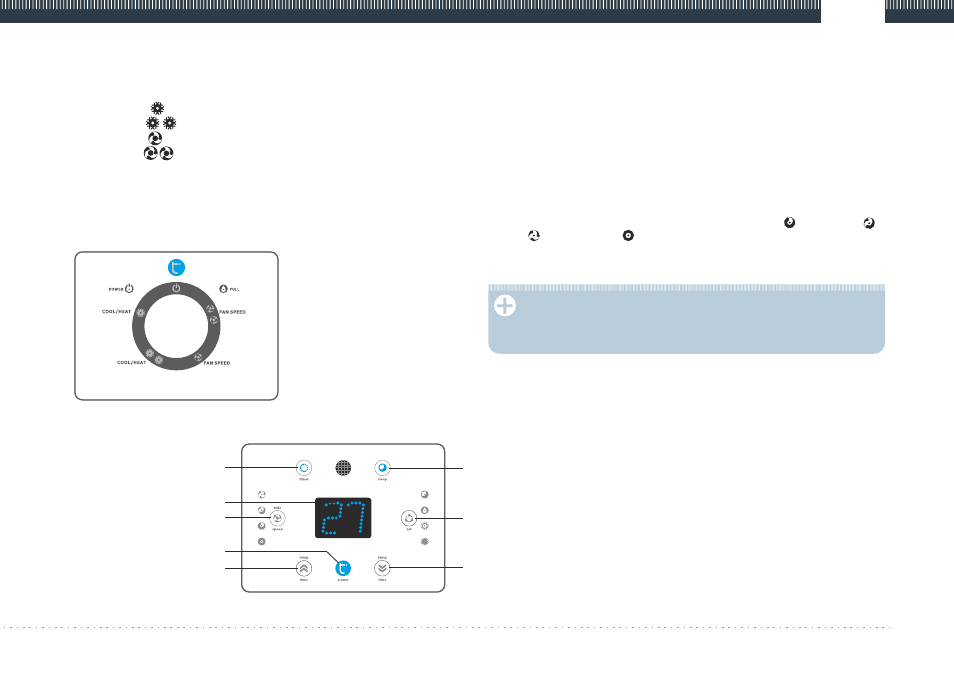
Control panel for AC TIM 05H P4, AC TIM 07H P4, AC TIM 09H P4
Fig. 7
5. CONTROL OF PORTABLE AIR CONDITIONER
Control panel (for AC TIM 05H P4, AC TIM 07H P4, AC TIM 09H P4) (Fig. 7).
1. Mode switch (Right-left)
Switch off central position of the handle
COOL/HEAT [ ] cooling / heating mode (low speed)
COOL/HEAT [ ] cooling / heating mode (high speed)
FAN SPEED [ ] ventilation mode (low speed)
FAN SPEED [ ] ventilation mode (high speed)
2. FULL Condensate fill-up tank indicator. If this indicator is on then the
condensate collection tank is full. It is necessary to switch off the unit and
drain the condensate by unscrewing the plug on pipe 11 (Fig. 4), then the
unit can be switched on again.
3. POWER air conditioner operation indicator.
Control panel for AC TIM 09HE P4 (Fig. 8)
1. POWER button. Press this button to switch on or off the unit.
2. SET button. Press this button to select the mode of heating,
dehumidification or cooling.
3. TEMP up button. In the cooling mode each press of this button raises the
set temperature by 1°C up to maximum 30°C. In the heating mode each
press of this button raises the set temperature by 1°C up to maximum 25°C.
4. TEMP down button. In the cooling mode each press of this button lowers
the set temperature by 1°C up to minimum 17°C. In the heating mode each
press of this button lowers the set temperature by 1°C up to minimum 15°C.
5. LED display. The display shows the set temperature or the timer. After the
temperature and time are set the display returns to indicating the current
temperature.
6. FAN speed button. Press this button to select low
, medium
,
[ ]
[ ]
high
or automatic fan speed button. When the automatic speed is
[ ]
[ ]
selected (in the cooling mode), high, medium or low speeds are selected
automatically depending on the difference between the set temperature
and the room temperature.
NOTICE.
You should not set the fan speed in the heating or dehumidification
mode since heating is performed at high fan speed and
dehumidification is performed at low fan speed.
7. Programmable timer on/off button.
ON timer. The ON timer is used to automatically switch on the unit upon
expiration of the set time.
Press the timer button when the unit is not operating to set the desired time
(buttons 3 and 4).
The unit will be automatically switched on when the set time expires.
Press POWER button before the set time expires. Time setting will be
canceled and the unit will be switched on.
OFF timer. The OFF timer is used to automatically switch off the unit upon
expiration of the set time.
Press the timer button when the unit is operating to set the desired time
(buttons 3 and 4).
The unit will be automatically switched off when the set time expires.
Press ON/OFF button before the set time expires. Time setting will be
canceled and the unit will be switched off.
8. SLEEP button: after pressing this button the fan sets to low speed.
(1) Press SLEEP button, set the sleep mode. Press the button again to cancel
the sleep mode.
www.timberk.com electric floor standing air onditioner ortable type (single case)
ENGLISH
Control panel for AC TIM 09HE P4
Fig. 8
2
4
5
6
3
1
7
8