D microphone sensitivity level, 0 index {•¥ 62), Search number (-^ 66) – Инструкция по эксплуатации Panasonic NV-DX100EN
Страница 153: 0 manuai focus (-^ 36), 0 white balance mode (-^ 82), 0 zebra pattern, Wind buffer [wind cut, S^(-»36)
Внимание! Текст в этом документе был распознан автоматически. Для просмотра оригинальной страницы Вы можете воспользоваться режимом "Оригинал".
ENGLISH
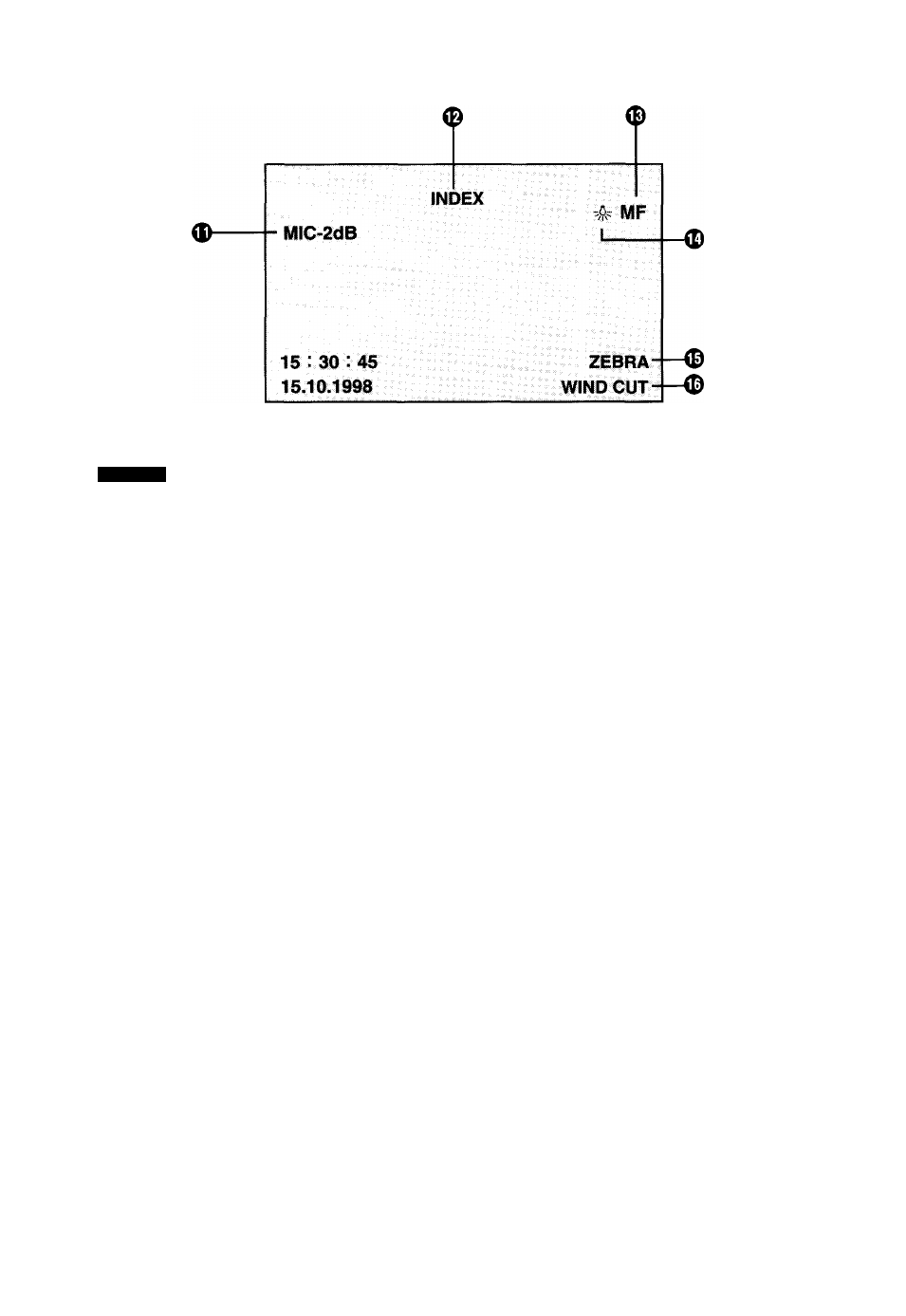
(D Microphone Sensitivity Level
This indication shows the selected microphone
sensitivity for recording. When it is displayed in red, it
indicates that the sound being recorded is distorted.
If you set [MIC LEVEL] 128) on the Camera Mode
Menu or [AUDIO DUB] (-♦ 132) on the VCR Mode
Menu to [AUTO], the Microphone Sensitivity Level
Indication does not appear.
0 index
{•¥
62)
INDEX:
The [INDEX] Indication flashes for a few
seconds while an index signal is being
recorded.
Search Number (-^ 66)
SI:
The figure indicates which number of
scene ahead from the present scene is to
be played back.
0 Manuai Focus (-^ 36)
If you select the Manual Focus Mode, the [MF]
Indication is displayed.
When the Movie Camera is in the Auto Mode, this
indication is not displayed.
0 White Balance Mode (-^ 82)
The White Balance Mode offers the following
possible settings:
Indoor (Incandescent Lamp) Mode
Outdoor Mode
:
Lock Mode
When the Movie Camera is in the Auto Mode, none
of the above 3 indications are displayed.
0 Zebra Pattern
If you set [2EBRAPATT] on the Menu (-► 128) to
[ON], the [ZEBRA] Indication is displayed.
® Wind Buffer [WIND CUT]
If you set [WIND CUT] on the Menu (-» 130) to [ON],
the [WIND CUT] Indication is displayed.
IX.
LEVEL](#5?;)1|,5^) (-
m
28)
DUB]
(->132) ¿Sgili5[AUTO] (g ti) at'
A' °
*!l(^62)
INDEX:
DEXjft
(-» 66)
Si:
s iu
iilli °
®¥«S^(-»36)
■ ttsmiME]
tn
Tjt o
S
iSTt'l
b
J
:
*:
^pS(0itS)W»J
tbZi
(-»128) ±&S[ZEBRAPATT]eS*®[ON]
0# ■ #ii/Tx|ZEBRA]is)E »
©JlSiliPi§[WIND CUT]
aim (-» 1
30)
±&S[WIND CUT]S*:S[ON]Bt '
#iim[WIND CUTligm “
172-