Operation – Инструкция по эксплуатации Hyundai H-CMD7080
Страница 10
Advertising
10
Operation
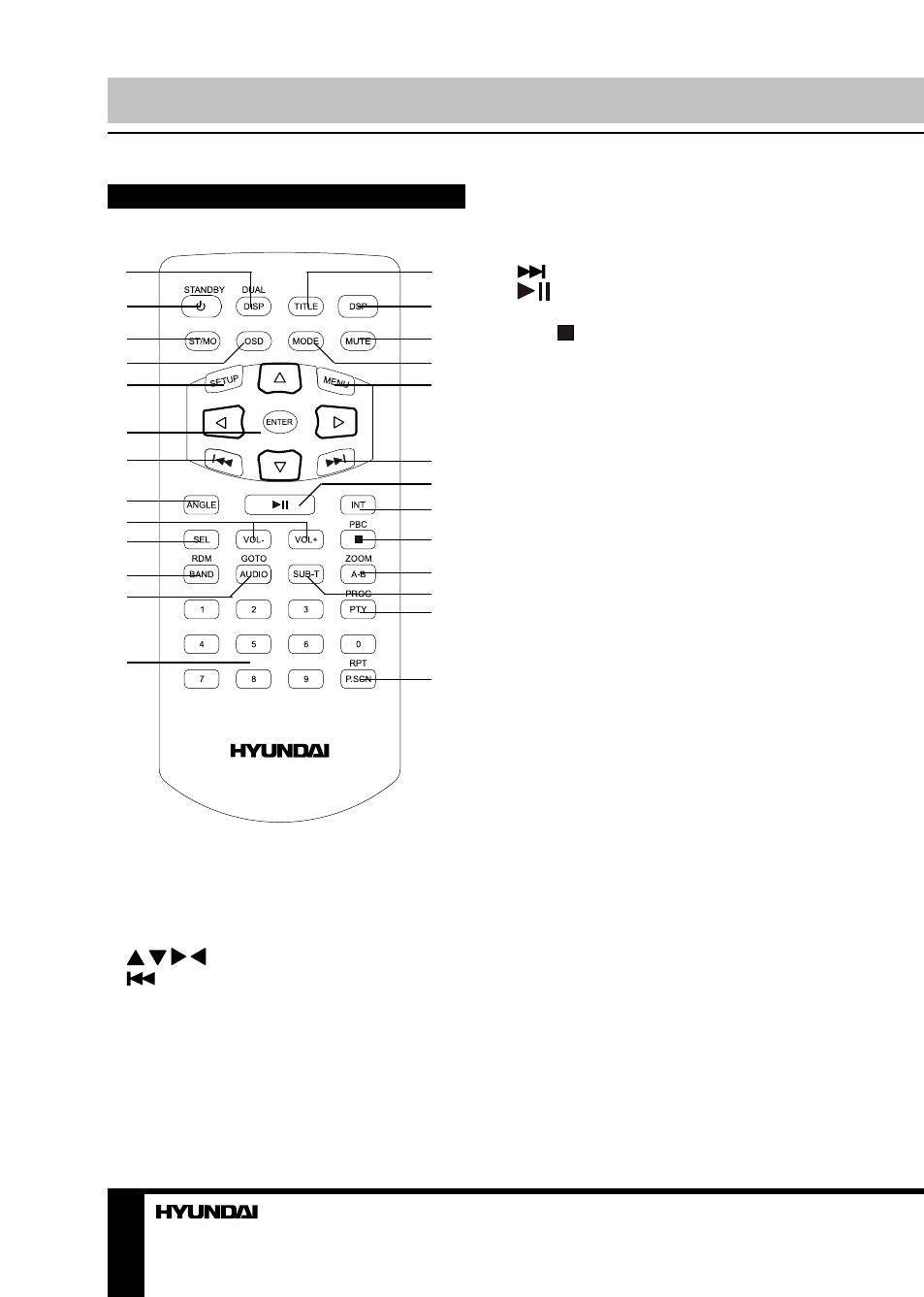
Remote controller
1
2
3
4
5
6
7
8
9
10
11
12
13
14
15
16
17
18
19
20
21
22
23
24
25
26
1. DUAL/DISP button
2. STANDBY button
3. ST/MO button
4. OSD button
5. SETUP button
6. / / / cursor buttons/ENTER button
7.
button
8. ANGLE button
9. VOL+/VOL- button
10. SEL button
11. RDM/BAND button
12. GOTO/AUDIO button
13. Number buttons
14. TITLE button
15. DSP button
16. MUTE button
17. MODE button
18. MENU button
19.
button
20.
button
21. INT button
22. PBC/ button
23. ZOOM/A-B button
24. SUB-T button
25. PROG/PTY button
26. RPT/P.SCN button
Changing the battery
1. Press the catch and at the same time pull
out the battery tray.
2. Insert the 1 x lithium battery, type CR
2025 3V with (+) mark facing up. Insert the
battery tray into the remote control.
Advertising