Operation – Инструкция по эксплуатации Hyundai H-CMMD4049
Страница 16
16
Operation
TV tuner operation
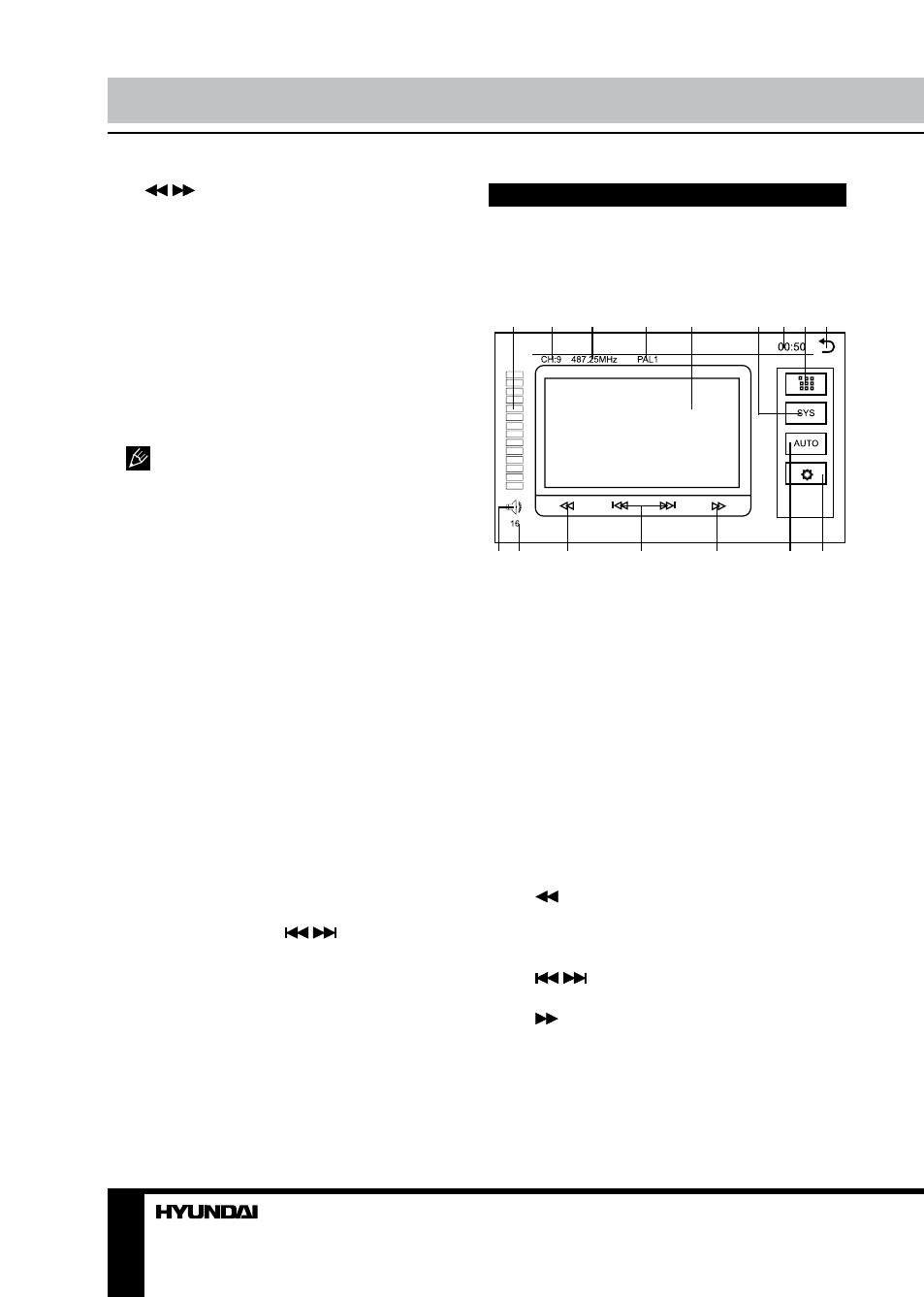
TV touch screen menu
When you select TV mode, following
touchable User Interface will be displayed:
1
2
3
4
5
6 7 8 9
10 11
12
13
14
15 16
1. Volume bar indicator. Touch to adjust
volume.
2. Current channel indicator.
3. Current frequency.
4. Current TV system.
5. Screen.
6. SYS button. Touch to select TV system.
7. Clock.
8. Keyboard button. Touch to call number
keyboard. Touch number buttons to select a
channel (1 - 30).
9. Return to Main menu.
10. Mute button. Touch to switch sound on/
off.
11. Volume level.
12.
button. Touch repeatedly to change
frequency step by step downwards. Touch
and hold for automatic search of the nearest
channel downwards.
13.
/
buttons. Touch to select
channels.
14.
button. Touch repeatedly to change
frequency step by step upwards. Touch and
hold for automatic search of the nearest
channel upwards.
15. AUTO button. Touch for automatic
search of channels.
5.
/
buttons. Touch to tune
automatically.
6. PTY program list. Touch an item to search
corresponding program.
AF (Alternative frequencies) function
Briefly press AF/EQ button on the RC to
enable AF function. When the radio signal
strength is poor, enabling the AF function
will allow the unit to automatically search
another station with the same PI (Program
Identification) as the current station but with
stronger signal strength.
AF indicator on the display will flash until
RDS information is received. If RDS service is
not available in your area, turn off the AF mode.
TA (Traffic alarm) function
Briefly press TA/LOUD button on the RC or
press and hold TA/LOU button on the panel
to activate the traffic alarm function. When AF
is on, the TA displays on TFT, or else, if there
is no TP information, the mode will search TP
station automatically.
When TA is playing, the volume will be
adjusted to a TA level automatically. When
other modes are activated (such as DVD,
AUX), if a TA program is played the mode will
skip to the RDS mode automatically. It will
resume to the primary mode after the TA is
over.
Program type
Briefly press PTY/ANGLE button on the RC
to activate PTY function.
When PTY is on, PTY ON appears on the
monitor, you can press
/
buttons on
the RC to select a program type to search
the special program. If PTY is off, PTY OFF
appears on the monitor, the searching is
stopped.