The today screen, Status indicators, English – Инструкция по эксплуатации Samsung SGH-i700
Страница 7
7
English
The Today screen
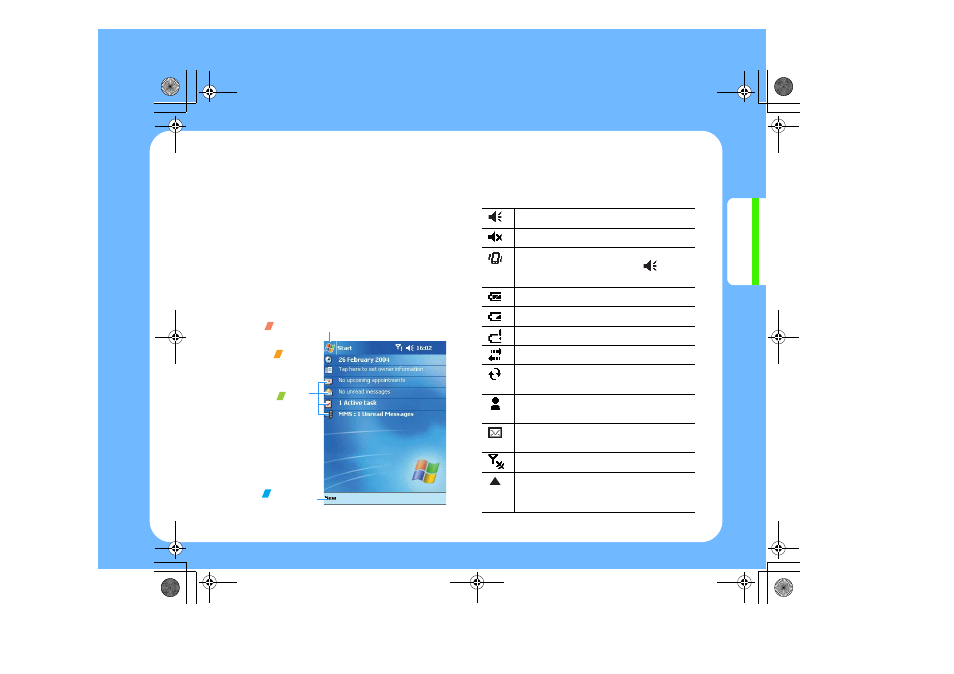
The centre of the Today screen provides, at a
glance, information that you need for the day.
Tap an item to view or edit details.
At the top of the screen are status icons. Tap an
icon to view details or change options. These
icons appear at the top of every screen on your
device, not only on the Today screen.
When you turn on your device for the first time
each day (or after four hours of inactivity), the
Today screen displays. You can also view it by
tapping Start and then Today.
Status indicators
Status indicators are displayed at the top of the
screen.
Tap to switch to a program.
Tap to
open the
Clock screen.
Tap to
view your day
information at
a glance.
Tap to create
a new item.
Indicates that all sounds are on.
Indicates that all sounds are off.
Appears when you set the ringer volume
for calls to Vibrate by tapping
on the
navigation bar.
Indicates that the battery is full.
Indicates that the battery is low.
Indicates that the battery is very low.
Indicates that a connection is in progress.
Indicates that synchronisation is
occurring.
Indicates that one or more instant
messages have been received.
Indicates that one or more e-mail/SMS
messages have been received.
Indicates your phone is switched off.
Appears when you’re roaming outside of
your home area and logged on to a
different network.
i700-QRG.book Page 7 Wednesday, January 5, 2005 2:03 PM