Getting your pocket pc phone ready to go – Инструкция по эксплуатации Samsung SGH-i700
Страница 4
Advertising
4
4
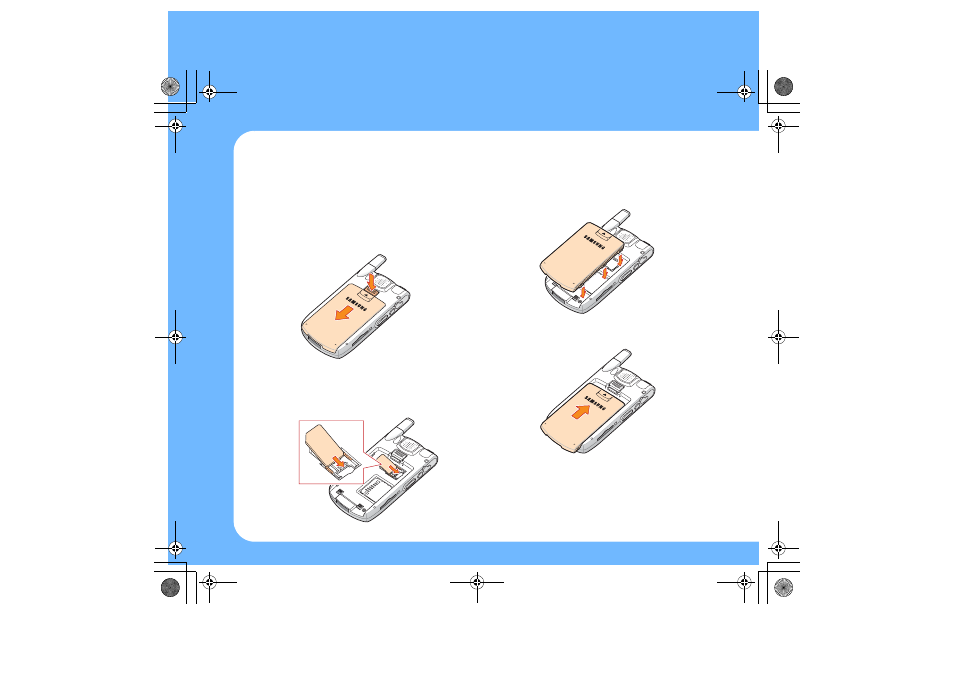
1. Insert the SIM card and battery
1. If the battery is installed in your phone, press
and hold the battery lock button and then
slide the battery off the phone.
2. Insert and slide the SIM card under the two
tabs, ensuring that the gold contacts of the
card face down into the phone.
3. Put the battery on the back of the phone.
4. Slide the battery up until it clicks into place.
Getting your Pocket PC Phone ready to go
i700-QRG.book Page 4 Wednesday, January 5, 2005 2:03 PM
Advertising
Посмотрите также другие документы по категории Сотовые телефоны Samsung:
- GT-C3510T (80 страниц)
- SGH-S500I (82 страницы)
- GT-M7600 (100 страниц)
- SGH-J600G (56 страниц)
- SGH-F700 Ultra Smart (70 страниц)
- GT-S3370 (96 страниц)
- GT-S3370 Corby 3G (96 страниц)
- GT-S5600 (78 страниц)
- SGH-X460 (172 страницы)
- SGH-P310 (164 страницы)
- E620 (110 страниц)
- SGH-B100 (2 страницы)
- SGH-D100 (102 страницы)
- SGH-i780 (74 страницы)
- SGH-i780 (21 cтраница)
- SGH-C120 (2 страницы)
- SGH-F310B (68 страниц)
- SGH-F310B (6 страниц)
- SGH-E360 (106 страниц)
- SGH-L811 (74 страницы)
- SGH-U100 (58 страниц)
- SGH-Z130 (117 страниц)
- GT-E2152 (78 страниц)
- SGH-P400 (95 страниц)
- SGH-E700 (97 страниц)
- SGH-E700 (96 страниц)
- SGH-C300B (2 страницы)
- SGH-T100 (84 страницы)
- SGH-F110 Adidas miCoach (66 страниц)
- SGH-X670 (110 страниц)
- SGH-B300 (2 страницы)
- GT-M8800 (88 страниц)
- SGH-D720 (325 страниц)
- SGH-J770 (62 страницы)
- GT-B5722 (84 страницы)
- SGH-C160B (2 страницы)
- SGH-R200EB (70 страниц)
- SGH-X620 (82 страницы)
- GT-C3010 (2 страницы)
- SGH-E390 (64 страницы)
- SGH-P100 (80 страниц)
- SGH-L870 (118 страниц)
- SGH-G600G (60 страниц)
- SGH-i600 (203 страницы)
- E610 (109 страниц)