Customising your pocket pc phone – Инструкция по эксплуатации Samsung SGH-i700
Страница 12
12
12
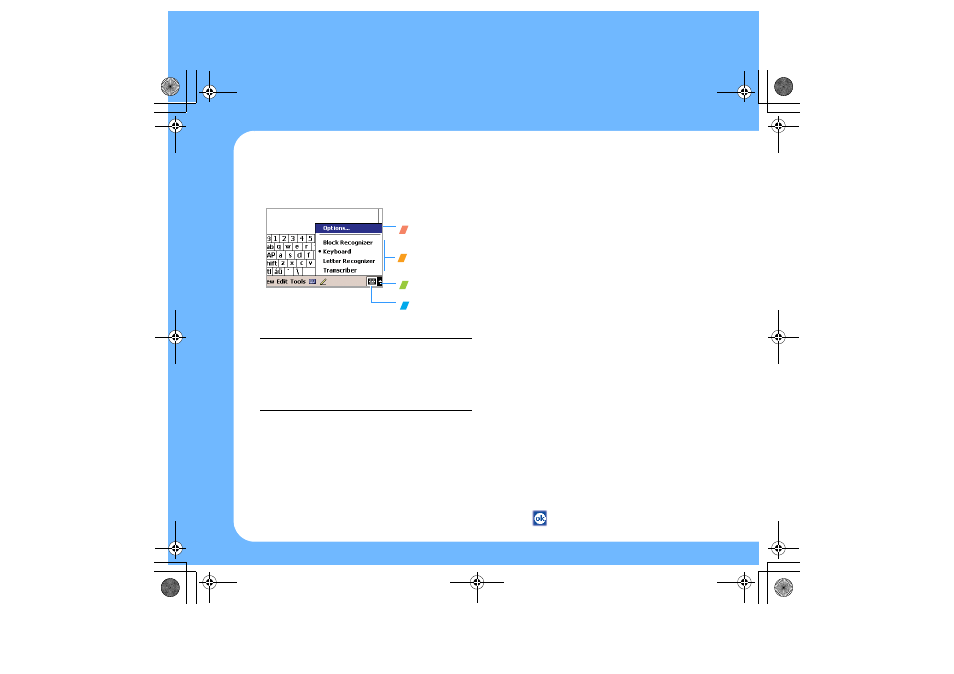
To select a different input panel, tap the arrow
next to the Input Panel button and then tap the
input panel that you want. To open the selected
input panel, tap the Input Panel button.
Note: For more information on using Block
Recognizer and Letter Recognizer, and
demonstrations on writing characters, tap
the question mark next to the writing area.
For more information on using Transcriber,
tap the question mark on its command bar.
Customising your
Pocket PC Phone
You can customise the Pocket PC Phone settings
to suit the way you work. From the Start menu,
tap Settings. Use Settings to do the following:
• Set time and date.
• Set alarms.
• Enter owner information to identify the owner
or user of the Pocket PC Phone.
• Assign a password to secure your phone or
information.
• Set sounds and notifications.
• Realign the screen.
• Customise the application buttons.
To set the time and date:
Using Settings, one of the first things you might
want to do is set the time and date.
1. From the Start menu, tap Settings ->
System tab -> Clock -> Home.
2. Adjust the time zone as needed.
3. Tap the hour, minutes, or seconds and then
tap the up or down arrow to change hour,
minute, or second.
4. Tap
to save your changes.
Tap to change
input panel
options.
Tap to see the list
of input panels.
Tap to open the
selected input
panel.
Tap to select an
input panel.
i700-QRG.book Page 12 Wednesday, January 5, 2005 2:03 PM