General guide – Инструкция по эксплуатации CITIZEN SR-270N
Страница 3
-E2-
General Guide
Turning on or off
To turn the calculator on, press [
ON
/
AC
] ; To turn the calculator off,
press [ OFF ].
Battery replacement
The calculator is powered by two alkaline batteries (G13 or LR44).
When the display dims, replace the batteries. Be careful not to be
injured when you replace the battery.
1. Unscrew the screws on the back of the calculator.
2. Insert a fl at bladed screwdriver into the slot between the
upper and lower case then carefully twist it to separate the
case.
3. Remove both batteries and dispose of them properly. Never
allow children to play with batteries.
4. Wipe off the new batteries with a dry cloth to maintain good
contact.
5. Insert the two new batteries with their fl at sides (plus termi-
nals) up.
6. Align the upper and lower cases then snap them to close
together.
7. Tighten the screws.
Auto power-off function
This calculator automatically turns it off when not operated for
approximately 9~15 minutes. It can be reactivated by pressing
[
ON
/
AC
] key and the display, memory, settings are retained.
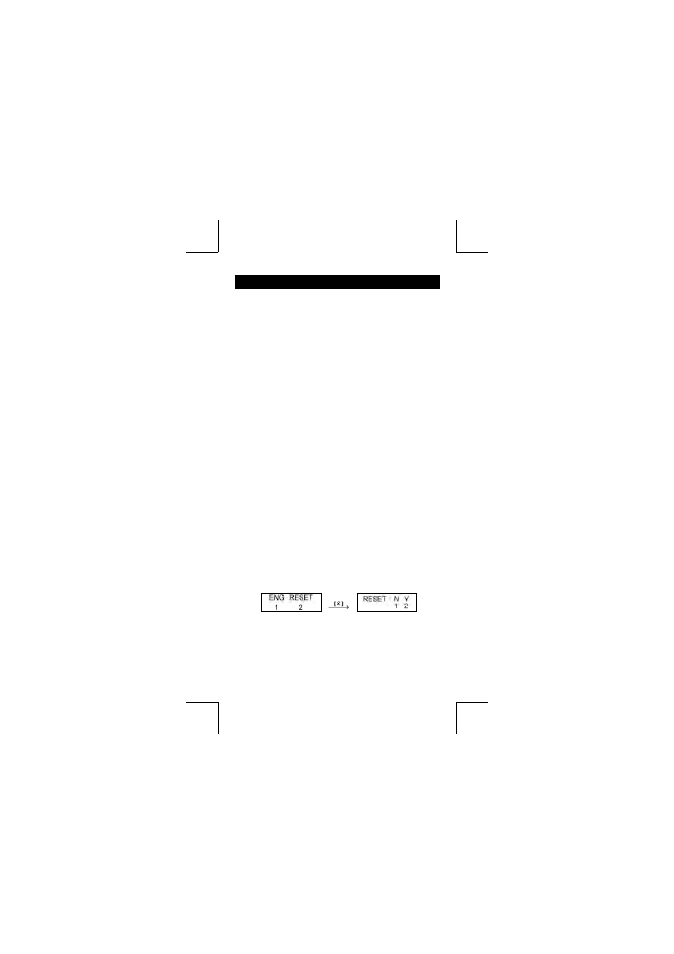
Reset operation
If the calculator is on but you get unexpected results, press [
ON
/
AC
]
and then [ MODE ] four times to display the below menu. A message
appears on the display to confi rm whether you want to reset the cal-
culator and clear memory contents after pressing [ 2 ].
To clear all variables, pending operations, statistical data, answers,
all previous entries, and memory, please press [ 2 ]. To abort the
reset operation without clearing the calculator, please press [ 1 ].
If the calculator is lock and further key operations becomes impos-
sible, please use a pointed object to press the reset hole to release
the condition. It will return all settings to default settings.