Front panel, Panel controls – Инструкция по эксплуатации Hyundai H-CMMD4040
Страница 7
Внимание! Текст в этом документе был распознан автоматически. Для просмотра оригинальной страницы Вы можете воспользоваться режимом "Оригинал".
Advertising
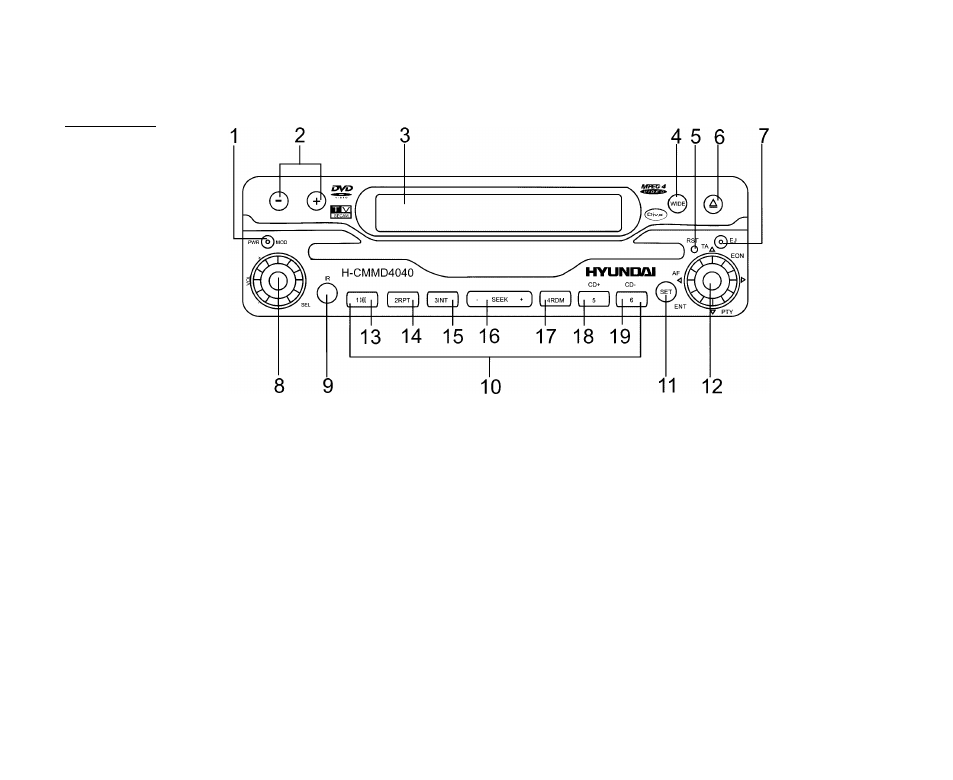
Panel controls
Front panel
1.
PWR/MOD button
Press POWER button to turn the power on, press and hold for 2 seconds to turn the power off.
2.
Adjust angle +/-
3.
TFT display
4.
WIDE button. Press it to choose screen format - 16:9 or 4:3
5.
RESET button
6.
OPEN button. Press it to open display
7.
EJECT button
8.
VOL knob
Rotate VOL knob to adjust the volume.
9.
IR sensor
10. PRESET STATION [1-6] buttons
7
Advertising