Инструкция по эксплуатации SIGMA BC 509
Страница 22
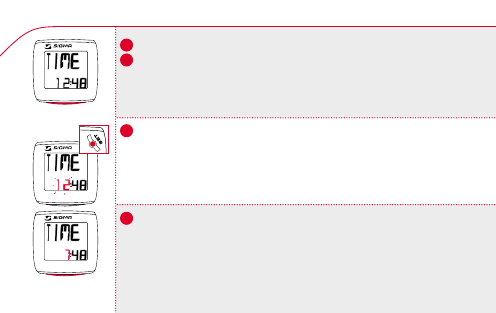
5.6 Time entry / Indstilling af klokkeslæt / Kellonajan asetus
k
Change the display to TIME using the MODE button.
k
Press SET button briefly, the digits for the hours flash.
k Set the hours with the MODE button.
k Change to the minute entry by pressing SET.
k Set the minutes with the MODE button.
k
Confirm by pressing the SET button. SET OK appears on the display.
k
Skift til TIME-visningen med MODE-knappen.
k
Tryk kort på SET-knappen, timecifrene blinker.
k
Indstil timerne med MODE-knappen.
k
Skift til minutindtastning med SET-knappen.
k
Indstil minutter med MODE-knappen.
k
Bekræft med SET-knappen. I displayet vises SET OK.
k
Valitse MODE-näppäimellä TIME-näyttö.
k
Paina lyhyesti SET-näppäintä, tuntinumerot vilkkuvat.
k
Aseta tunnit MODE-näppäimellä.
k
Siirry SET-näppäimellä minuuttien asetukseen.
k
Aseta MODE-näppäimellä minuutit.
k
Vahvista valinta SET-näppäimellä. Näyttöön tulee SET OK.
n
MODE
n
MODE
509
509
509
SET
!
DK
GB
US
FIN
22