Инструкция по эксплуатации SIGMA BC 509
Страница 18
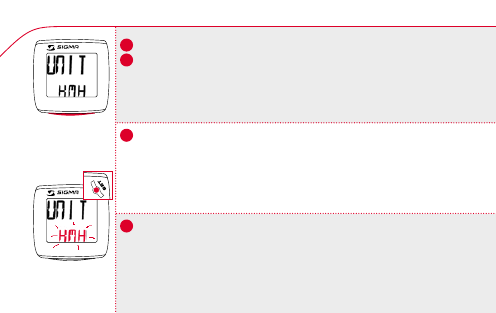
5.4 KMH/MPH Entry / Indstilling KMH/MPH / Asetus KMH/MPH
k
Skift til UNIT-visningen med MODE-knappen.
k
Tryk kort på SET-knappen.
k
I displayet vises KMH. Displayet blinker.
k
Indstil MPH eller KMH med MODE-knappen.
k
Bekræft med SET-knappen. I displayet vises SET OK.
Ved omstilling fra KMH til MPH ændrer strækningens format sig automatisk
fra km til mi og klokkeslættet fra 24 h-modus til 12 h-modus.
k
Valitse MODE-näppäimellä UNIT-näyttö.
k
Paina lyhyesti SET-näppäintä.
k
Näyttöön tulee KMH, joka vilkkuu.
k
Valitse MODE-näppäimellä joko MPH tai KMH.
k
Vahvista valinta SET-näppäimellä. Näyttöön tulee SET OK.
Kun vaihdetaan KMH -> MPH, matkan muoto muuttuu automaattisesti
kilometreistä maileiksi ja kellonaika muuttuu 24h-tilasta 12h-tilaan.
k
Change the display to UNIT using the MODE button.
k Press the SET button briefly.
k
KMH appears on the display and flashes.
k
Select MPH or KMH using MODE.
k
Confirm by pressing the SET button. SET OK appears on the display.
Switching from KMH to MPH automatically changes the format of the distance
from km to mi and the clock from 24h mode to 12h mode.
n
MODE
509
509
SET
!
DK
GB
US
FIN
18