English – Инструкция по эксплуатации Asus CG8350
Страница 16
Advertising
1-6
Chapter 1: Getting started
English
English
English
English
• If your computer comes with an ASUS Graphics Card, the graphics card is set as the
primary display device in the BIOS. Hence, connect your monitor to a display output port
on the graphics card.
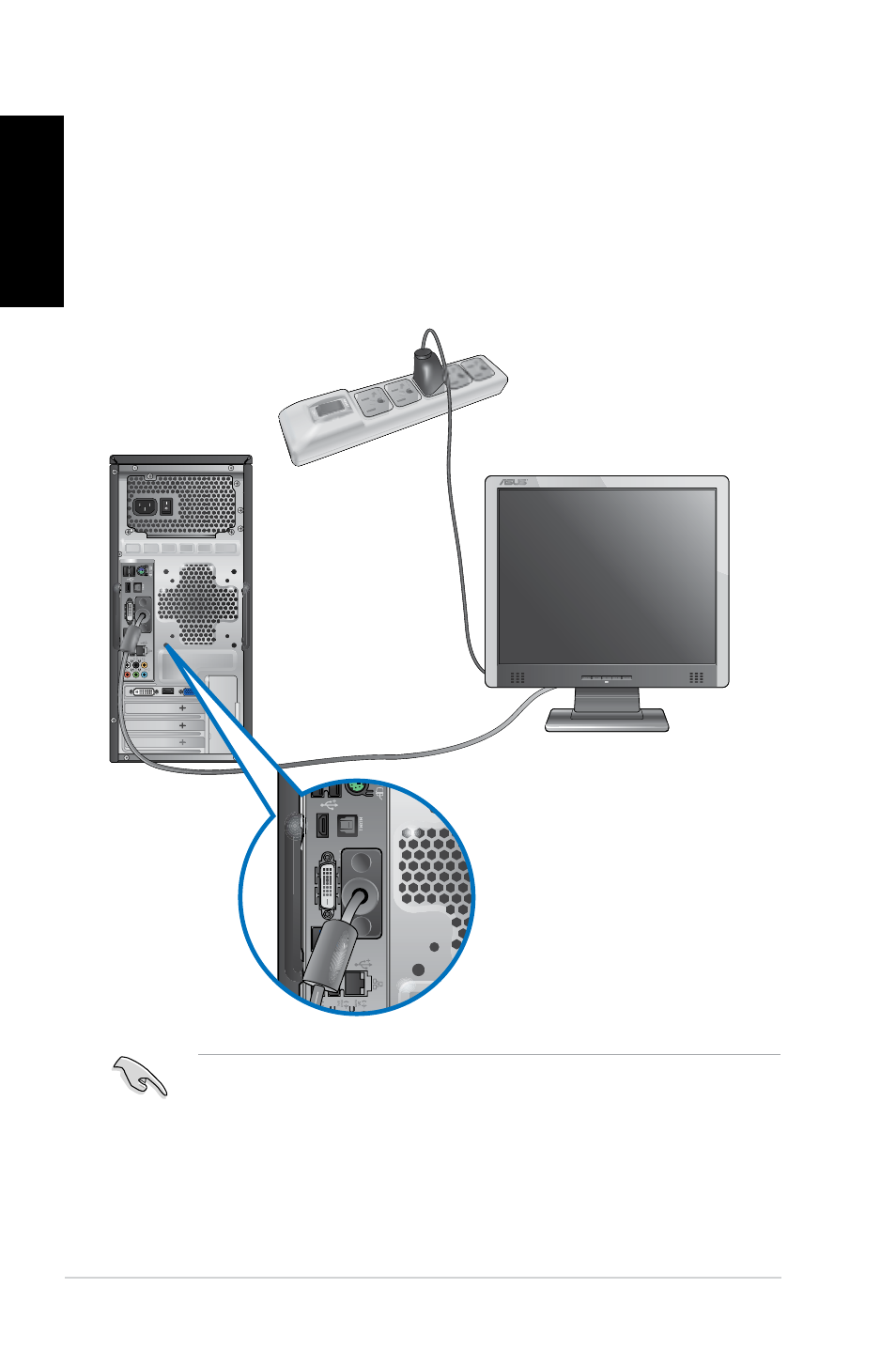
Using the onboard display output ports
Connect your monitor to the onboard display output port.
To connect an external monitor using the onboard display output ports:
1.
Connect a VGA monitor to the VGA port, or a DVI-D monitor to the DVI-D port, or an
HDMI monitor to the HDMI port on the rear panel of your computer.
2.
Plug the monitor to a power source.
Advertising
Посмотрите также другие документы по категории Компьютеры Asus:
- ROG CG8565 (246 страниц)
- Essentio CS5111 (26 страниц)
- ET2010AG (38 страниц)
- ET1611PUT (38 страниц)
- ET1611PUK (38 страниц)
- ET2011AGK (42 страницы)
- ET2400IT (42 страницы)
- SCD (38 страниц)
- ET2002 (40 страниц)
- ET2701INTI (44 страницы)
- ET2203 (40 страниц)
- CG8250 (239 страниц)
- CM6730 (198 страниц)
- CG8270 (230 страниц)
- CG8270 (72 страницы)
- V2-P5G31 (2 страницы)
- CM1730 (198 страниц)
- CG8265 (210 страниц)
- CM1740 (198 страниц)
- Eee Pad Slider SL101 (54 страницы)
- Nexus 7 (108 страниц)
- Eee Pad Transformer TF101G (56 страниц)
- Transformer Pad Infinity TF700T (90 страниц)
- EEE PC 904 (73 страницы)
- M11AA (90 страниц)
- M31AD (85 страниц)
- M51AC (85 страниц)
- CP6230 (198 страниц)
- CP6230 (66 страниц)
- ET2012AGKB (44 страницы)
- ET2013IGKI (42 страницы)
- ET2001B (30 страниц)
- M70AD (71 cтраница)
- VivoTab RT 3G (76 страниц)
- ET1602C (38 страниц)
- ET2300INTI (56 страниц)
- CM1630 (246 страниц)
- Fonepad Note 6 (102 страницы)
- Fonepad 7 (24 страницы)
- Fonepad 7 (102 страницы)
- Eee Pad Transformer Prime TF201 (70 страниц)
- Eee Pad Transformer Prime TF201 (80 страниц)
- Eee Pad Transformer Prime TF201 (6 страниц)
- ET2702IGKH (60 страниц)
- VivoTab Smart (22 страницы)