Starting to use your yoga tablet 10 hd – Инструкция по эксплуатации Lenovo Yoga Tablet 10 HD+ B8080
Страница 7
Advertising
Turning on/off
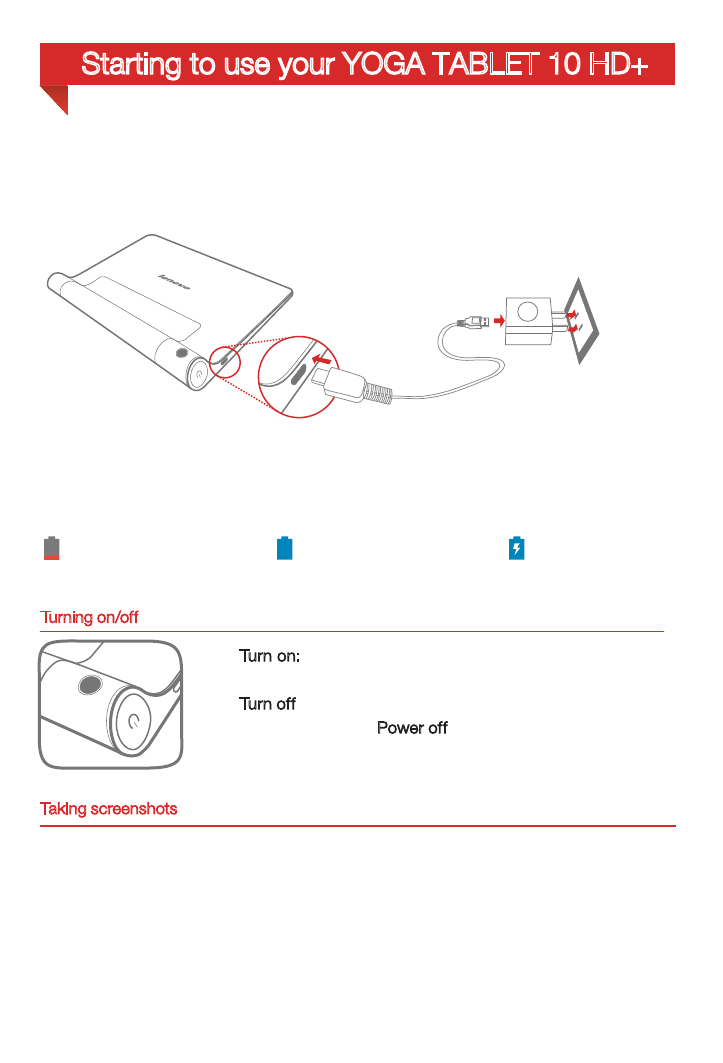
Before using your YOGA TABLET 10 HD+, you might need to charge the battery.
Charge the battery as shown.
Connect your YOGA TABLET 10 HD+ to a power outlet using the included cable and
USB power adapter.
Low battery
Fully charged
Charging
Turn on: Press and hold the On/Off button until the
Lenovo logo is displayed.
Turn off: Press and hold the On/Off button for a few
seconds, then tap Power off.
Starting to use your YOGA TABLET 10 HD+
Taking screenshots
Press and hold the On/off button and the Volume down button at the same time.
Advertising
Посмотрите также другие документы по категории КПК Lenovo:
- A1 (38 страниц)
- S5000 Tablet (6 страниц)
- S5000 Tablet (26 страниц)
- S2110 Tablet (37 страниц)
- Yoga Tablet 8 B6000 (29 страниц)
- Yoga Tablet 10 B8000 (6 страниц)
- Yoga Tablet 8 B6000 (30 страниц)
- Yoga Tablet 10 B8000 (22 страницы)
- A7-40 Tablet (25 страниц)
- A7-40 Tablet (31 cтраница)
- S6000L Tablet (2 страницы)
- S6000L Tablet (29 страниц)
- S6000L Tablet (25 страниц)
- ThinkPad 10 (104 страницы)
- ThinkPad 10 (2 страницы)
- ThinkPad Tablet 2 (88 страниц)
- ThinkPad Tablet 2 (2 страницы)
- ThinkPad 8 (76 страниц)
- ThinkPad 8 (2 страницы)
- Yoga Tablet 10 HD+ B8080 (28 страниц)
- A8-50 Tablet (22 страницы)
- A8-50 Tablet (31 cтраница)
- ThinkPad Tablet (1 cтраница)
- ThinkPad Tablet (102 страницы)
- ThinkPad Tablet (20 страниц)
- S6000 Tablet (2 страницы)
- S6000 Tablet (29 страниц)
- S6000 Tablet (6 страниц)
- S6000 Tablet (30 страниц)
- A7 30 Tablet (32 страницы)
- A7 30 Tablet (26 страниц)
- A7 30 Tablet (17 страниц)
- Yoga Tablet 10 B8000 (30 страниц)
- Yoga Tablet 10 B8000 (29 страниц)
- A10-70 Tablet (22 страницы)
- A10-70 Tablet (17 страниц)
- A10-70 Tablet (30 страниц)
- A10-70 Tablet (6 страниц)
- A1000 Tablet (2 страницы)
- A1000 Tablet (32 страницы)
- A1000L Tablet (2 страницы)
- A1000L Tablet (24 страницы)
- A3000 Tablet (2 страницы)
- S2109 Tablet (50 страниц)