Gravity sensor – Инструкция по эксплуатации Lenovo A60+ Smartphone
Страница 7
Advertising
7
Gravity sensor
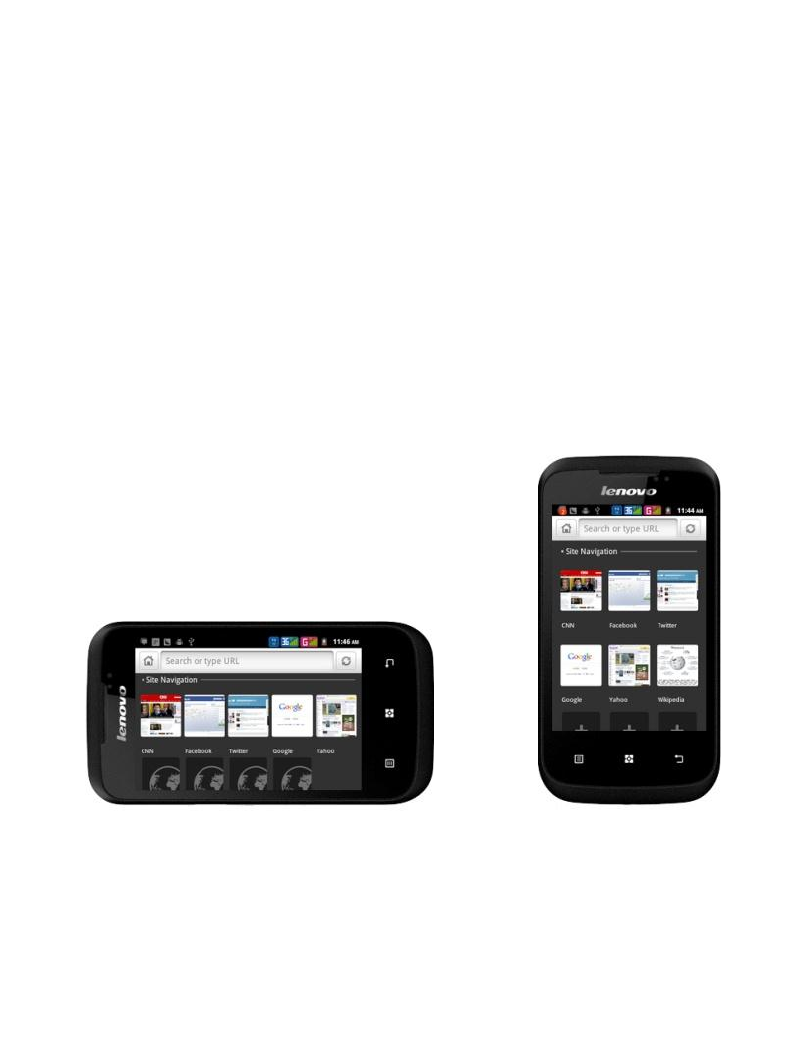
Auto rotate screen according to the rotation of the device being hold.
You can lock the A60+ screen in the current direction screen rotation
lock downward. To unlock the screen direction: Menu - System
settings - Display
– Auto rotate screen.
Use the A60+ in the landscape or portrait mode
After launching one application, you can rotate the screen to your
preferred direction.
.
Advertising
Посмотрите также другие документы по категории Сотовые телефоны Lenovo:
- S660 Smartphone (23 страницы)
- S660 Smartphone (6 страниц)
- S930 Smartphone (6 страниц)
- S930 Smartphone (21 cтраница)
- A526 Smartphone (22 страницы)
- A526 Smartphone (6 страниц)
- S850 Smartphone (66 страниц)
- S850 Smartphone (17 страниц)
- S856 Smartphone (64 страницы)
- S856 Smartphone (17 страниц)
- A536 Smartphone (17 страниц)
- A536 Smartphone (61 cтраница)
- K900 Smartphone (21 cтраница)
- K900 Smartphone (14 страниц)
- S890 Smartphone (56 страниц)
- A859 Smartphone Lenovo (30 страниц)
- A859 Smartphone Lenovo (6 страниц)
- A606 Smartphone (64 страницы)
- A606 Smartphone (17 страниц)
- S960 Smartphone (23 страницы)
- S960 Smartphone (6 страниц)
- S820 Smartphone (28 страниц)
- A680 Smartphone (23 страницы)
- A680 Smartphone (6 страниц)
- A516 Smartphone (18 страниц)
- A516 Smartphone (6 страниц)
- K910L Smartphone (6 страниц)
- K910L Smartphone (25 страниц)
- P770 Smartphone (56 страниц)
- A850 Smartphone (6 страниц)
- A850 Smartphone (22 страницы)
- P700i Smartphone (40 страниц)
- S880 Smartphone (40 страниц)
- S650 Smartphone (6 страниц)
- S650 Smartphone (21 cтраница)
- K920 Smartphone (68 страниц)
- A690 Smartphone (40 страниц)
- S720 Smartphone (32 страницы)
- A390 Smartphone (32 страницы)
- A328 Smartphone (61 cтраница)
- A328 Smartphone (17 страниц)
- A316i Smartphone (6 страниц)
- A316i Smartphone (24 страницы)
- S860 Smartphone (26 страниц)