Инструкция по эксплуатации Sony DSC-W550
Страница 11
Advertising
GB
11
GB
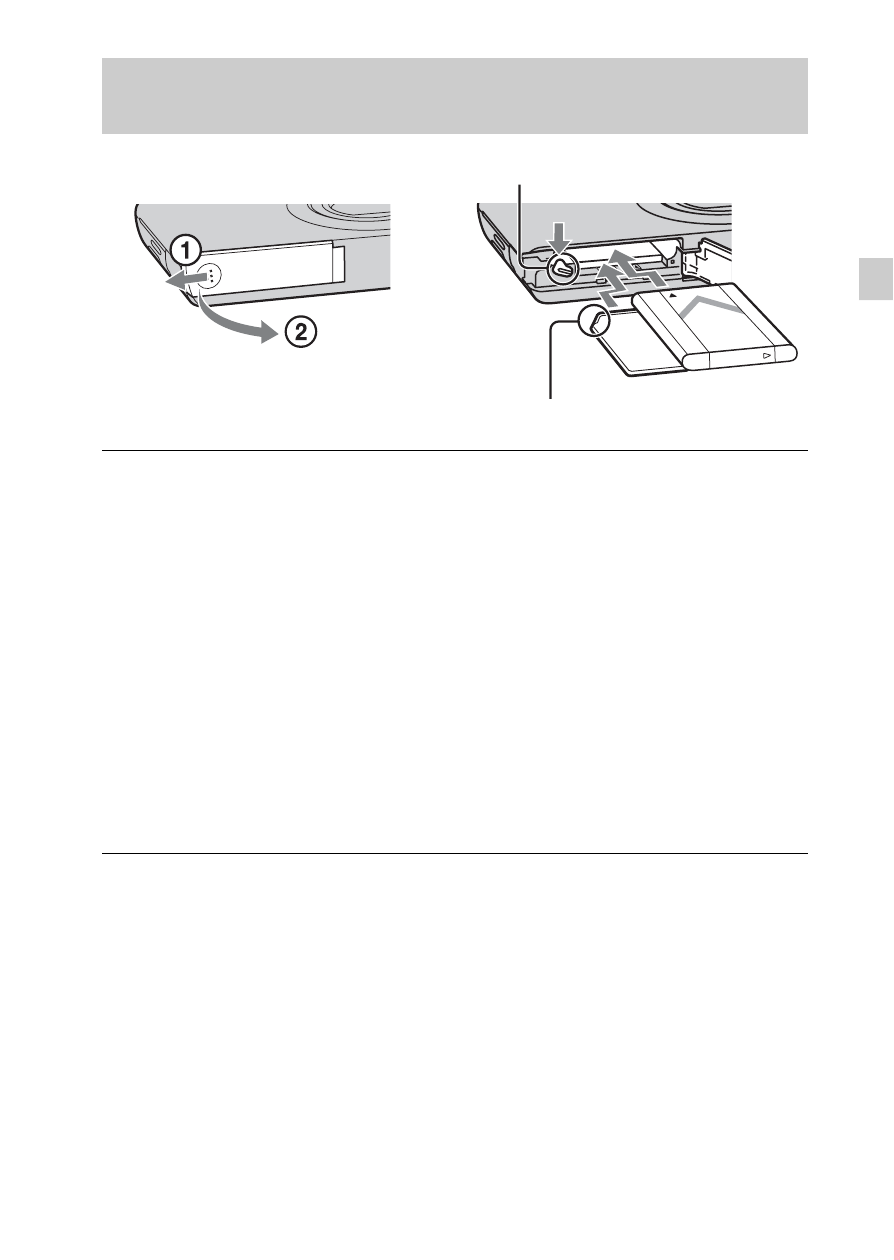
Inserting the battery pack/a memory card (sold
separately)
1
Open the cover.
2
Insert the memory card (sold separately).
• With the notched corner facing as illustrated, insert the memory card
until it clicks into place.
3
Insert the battery pack.
• Align the battery pack with the guide arrow inside the battery insertion
slot. Then, insert the battery pack until the battery eject lever locks into
place.
4
Close the cover.
• Closing the cover with the battery inserted incorrectly may damage the
camera.
Ensure the notched corner faces correctly.
Eject lever
Advertising
Посмотрите также другие документы по категории Фоторамки Sony:
- DPF-C1000 (2 страницы)
- DPF-A710 (62 страницы)
- DPF-A710 (32 страницы)
- DPF-V900W (64 страницы)
- DPF-E75 (33 страницы)
- DPF-D70 black (52 страницы)
- DPF-D70R (52 страницы)
- DPF-D100 (52 страницы)
- DPF-V900B (64 страницы)
- DPF-V1000 (84 страницы)
- DPF-D1020 (40 страниц)
- DPF-D82 (72 страницы)
- DPF-D70 (52 страницы)
- DPF-D72 (68 страниц)
- DPF-V900 (64 страницы)
- DPF-X1000N (84 страницы)
- DPF-A73 (50 страниц)
- DPF-D830L (63 страницы)
- DPF-D830L (44 страницы)
- DPF-VR100 (48 страниц)
- DPF-VR100 (75 страниц)
- DPF-WA700 (85 страниц)
- DPF-WA700 (2 страницы)
- HDPS-M1 (52 страницы)
- DPF-X95 (36 страниц)
- DPF-E710 (32 страницы)
- DPF-E710 (51 cтраница)
- DPF-D85 (36 страниц)
- SAL75300 (2 страницы)
- HDR-PJ580VE (211 страниц)
- ILCA-77M2 (245 страниц)
- SAL1635Z (2 страницы)
- SLT-A37 (243 страницы)
- SLT-A37 (195 страниц)
- DCR-SR42E (155 страниц)
- DSC-W810 (2 страницы)
- HDR-UX7E (147 страниц)
- HDR-PJ340E (32 страницы)
- NEX-F3 (212 страниц)
- NEX-F3 (203 страницы)
- HDR-CX520VE (147 страниц)
- HDR-CX520VE (145 страниц)
- DCR-SX73E (108 страниц)
- DCR-SX73E (139 страниц)
- VRD-P1 (15 страниц)