Инструкция по эксплуатации Samsung ST1000
Страница 6
Advertising
6
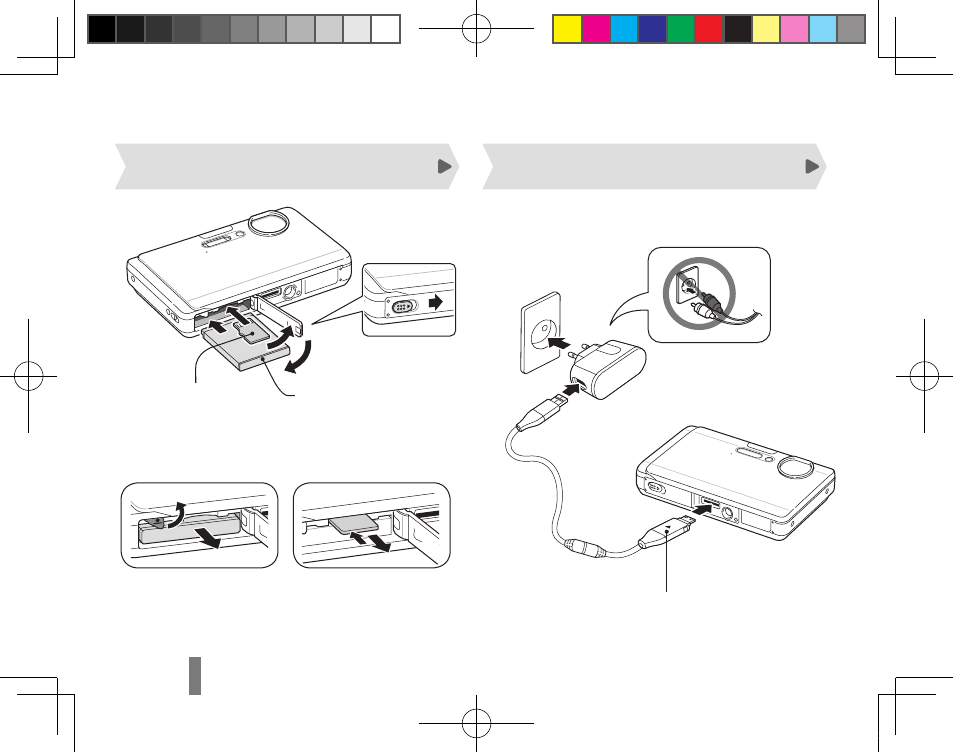
Setting up your camera
Inserting the battery and memory card
Charging the battery
Indicator light
Red
▪
: Charging
Green
▪
: Fully charged
▼
Removing the battery
▼
Removing the memory card
Push gently until the card
disengages from the camera
and then pull it out of the slot.
With the Samsung
3
logo facing down
With the gold-
2
coloured contacts
facing up
1
4
Before using the camera for the first time, you must
charge the battery.
ST1000_QSM_EUR2.indb 6
2009-09-14 오후 4:53:12
Advertising
Посмотрите также другие документы по категории Фотоаппараты Samsung:
- S1030S (82 страницы)
- DIGIMAX-S1000S (82 страницы)
- GX10 (258 страниц)
- DIGIMAX-S500S (78 страниц)
- KENOX X70 (78 страниц)
- DIGIMAX-S700B (78 страниц)
- NV11 (90 страниц)
- NV-10 (74 страницы)
- DIGIMAX-S800BL (82 страницы)
- S850 (90 страниц)
- NV3 (94 страницы)
- DIGIMAX V3 (94 страницы)
- PL60 (103 страницы)
- PL60 (82 страницы)
- S1060 (94 страницы)
- DIGIMAX-I6S (90 страниц)
- S830B (82 страницы)
- ES15 (82 страницы)
- ES15 (98 страниц)
- L74 (98 страниц)
- DIGIMAX U-CA 5 (136 страниц)
- NX100 (136 страниц)
- NX100 20-50мм (136 страниц)
- KENOX LX1 (132 страницы)
- ES78 (99 страниц)
- NV4 (119 страниц)
- Digimax 200 (32 страницы)
- DIGIMAX i8 Bl (135 страниц)
- KENOX Q25 QIDE (132 страницы)
- KENOX D-360 (124 страницы)
- NX200 18-55 (149 страниц)
- ES27 RU (96 страниц)
- Digimax 410 RU (120 страниц)
- KENOX X85 (90 страниц)
- KENOX D-3100 (104 страницы)
- KENOX D5 (120 страниц)
- STC-WB500 Black (114 страниц)
- Digimax 401 (96 страниц)
- KENOX D7 (116 страниц)
- ES17 (92 страницы)
- ES19 (98 страниц)
- Digimax 201 (120 страниц)
- KENOX L80 (90 страниц)
- STC-L310B (107 страниц)
- STC-ES10 Black (97 страниц)