Инструкция по эксплуатации SIGMA BC 1609
Страница 40
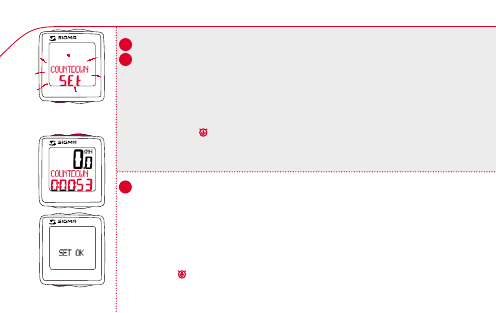
6.4 Countdown entry / Indtastning af countdown
k
Use MODE 2 to switch to COUNTDOWN display.
k Hold down SET button. Display flashes.
Set the value using the MODE 2 button or the RESET button.
k
Move to the next figure using the MODE 1 button.
Set the value as described above.
k
Confirm by pressing the SET button. SET OK appears on the display.
k
Start/Stop:
Press the SET button briefly.
The icon
appears on the display.
Setting the countdown to zero: Hold down RESET button for
3 seconds.
k
Skift til COUNTDOWN +/- display med MODE 2-knappen.
k Hold SET-knappen trykket. Display blinker.
Indstil værdi med RESET/MODE 2-knappen.
k
Skift til næste ciffer med MODE 1-knappen.
Indstil værdien som ovenfor angivet.
k
Bekræft med SET-knappen. I displayet vises SET OK.
k
Start/Stop: Tryk kort på SET-knappen.
Ikon vises på displayet.
Nulstilling: Hold RESET-knappen trykket i 3 sekunder.
GB
US
DK
40
1609
1609
n
SET
n
SET
1609
RESET
!
_
+
!
MODE 2
40