Wireless connections (cont.) – Инструкция по эксплуатации Asus WL-167g
Страница 11
10
ASUS USB Wireless LAN Adapter
English
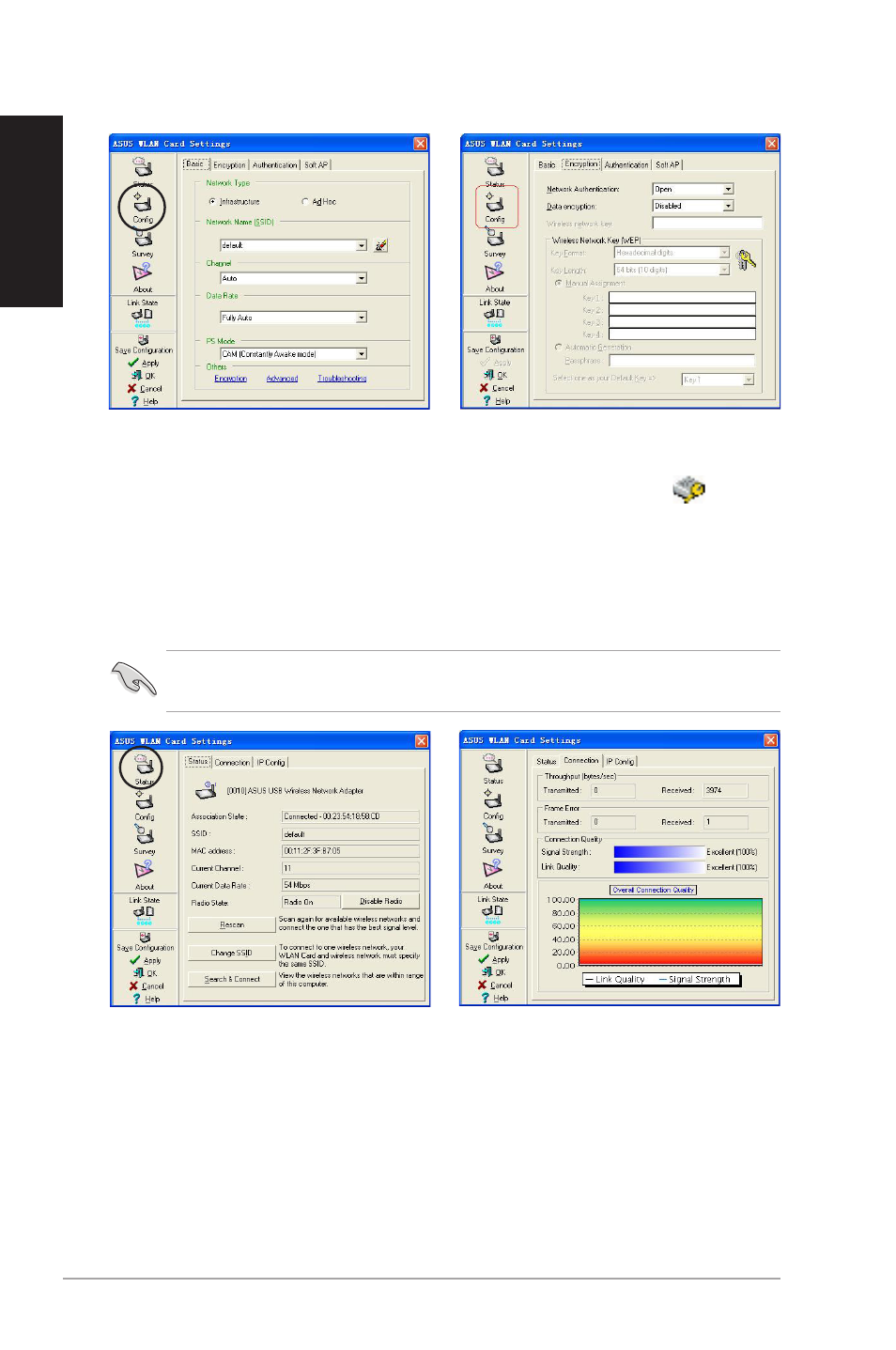
3. Click the Config button to
configure the device settings.
Set the Network type to Ad hoc,
then enter the Network Name
(SSID) and Channel of wireless
device you wish to connect.
Click Apply when done.
4. Click the Encryption tab if your
selected wireless device has an
enabled encryption ( ).
Obtain the encryption keys from
the network administrator, then
enter them in the Key fields.
Click Apply when finish.
5. Click the Status button to verify
if the ASUS USB Wireless
LAN Adapter is connected to
the device. If connection is
established, the Association
State field shows “Connected
- XX:XX:XX:XX:XX:XX”.
6. Click the Connection tab to
display the connection strength
and link quality between the
ASUS USB Wireless LAN
Adapter and the wireless
device.
IMPORTANT! The encryption settings of the ASUS USB Wireless LAN
Adapter and the wireless device must be identical to establish connection.
Wireless Connections (Cont.)