English 27 operations – Инструкция по эксплуатации JVC KD-DV7307
Страница 27
Advertising
ENGLISH
27
OPERATIONS
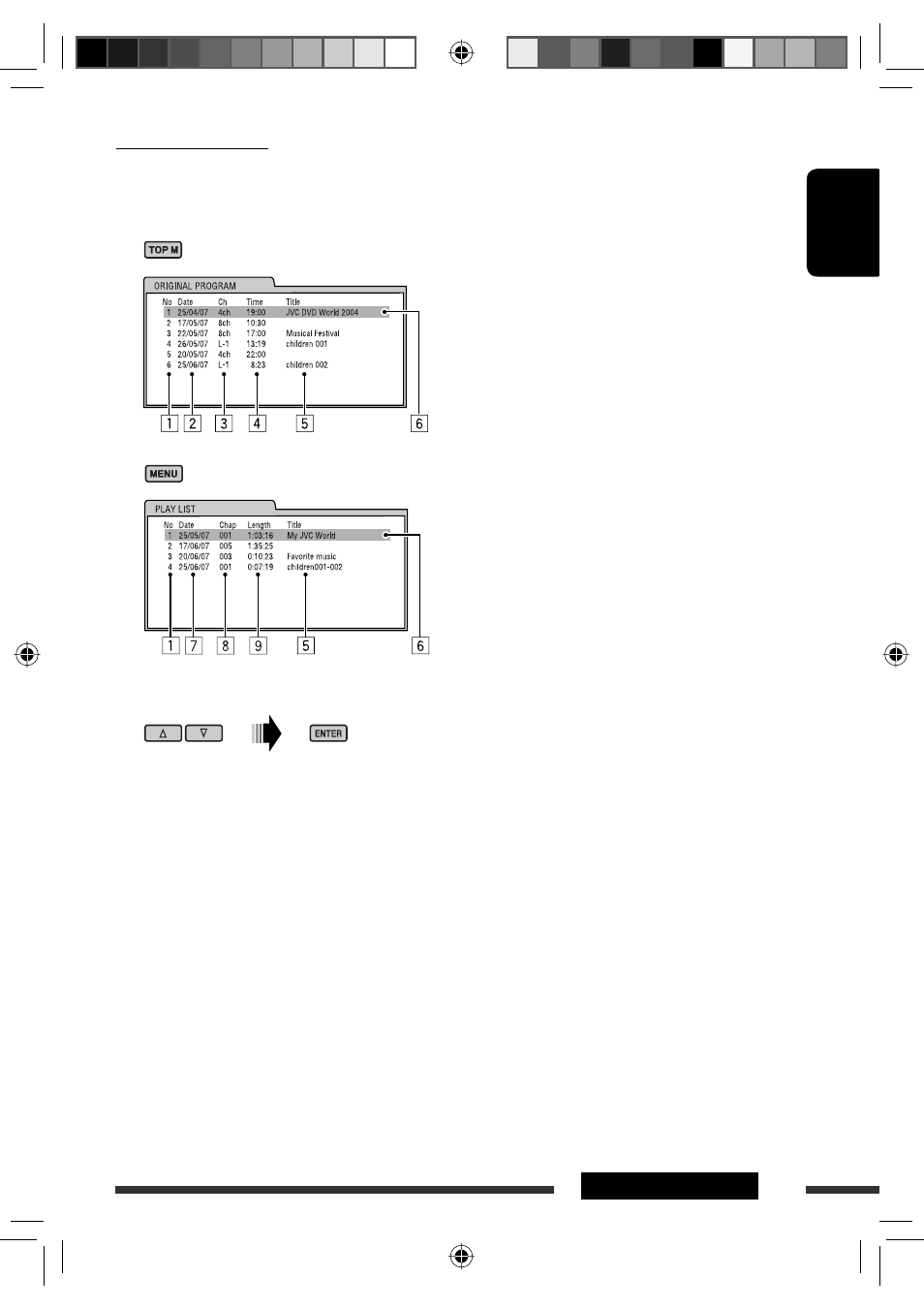
List screen for DVD-VR
You can use ORIGINAL PROGRAM or PLAY LIST screen anytime while playing DVD-VR with its data recorded.
1
Select a list screen.
2
Select an item from the list.
1
Program/playlist number
2
Recording date
3
Recording source (TV station, the input terminal of the recording equipment, etc.)
4
Start time of recording
5
Title of the program/playlist *
6
Current selection (highlighted bar)
7
Creating date of playlist
8
Number of chapters
9
Playback time
* The title of the original program or playlist may not be displayed depending on the recording equipment.
EN24-31_DV7308_001A_1.indd 27
EN24-31_DV7308_001A_1.indd 27
1/25/07 4:17:30 PM
1/25/07 4:17:30 PM
Advertising
Эта инструкция подходит к следующим моделям: