Overview of the control panel – Инструкция по эксплуатации Elenberg WM-3620D
Страница 16
16
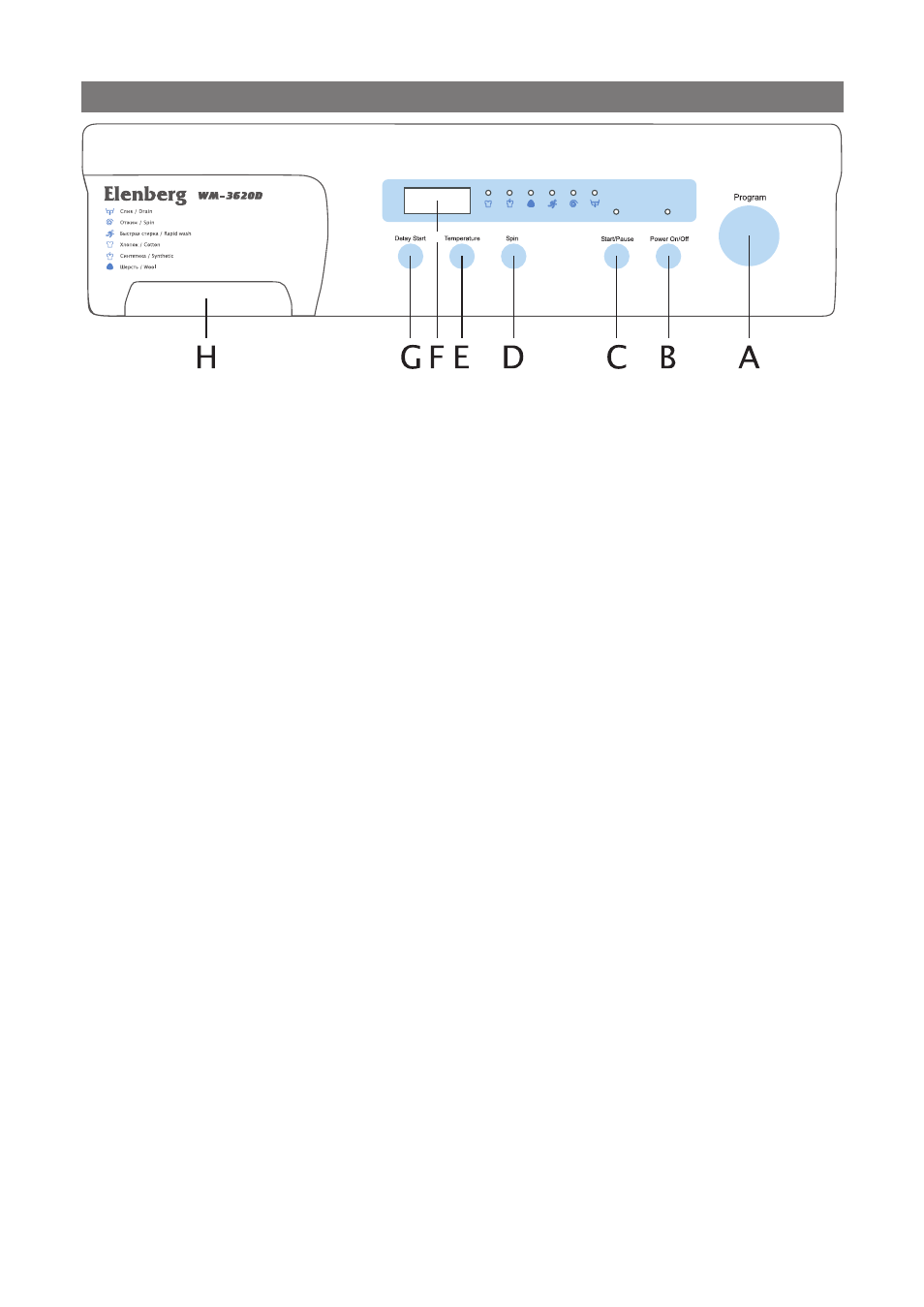
A Course button
Turn the button to select one of the six available wash programs.
The light is on for the optional course.
B Power button
Press once to turn the washing machine on, press again to turn the
washing machine off.
C Start/pause button
Press to pause and restart programs. If you want the course can-
celled, press the start/pause button firstly, then the power button
is pressed up
D Spin selection button
Press the button repeatedly to cycle through the available spin
speed options. The unproper option can not displayed for centain
course.
E Temperature selection button
Press the button repeatedly to cycle through the available water
temperature options.
F Display window
Displays wash cycle(remaining time, temperature option, spin op-
tion) and error messages by LED lamps . During execution of the
program, the program indicator blinks. For some curtain condi-
tions, , it is the normal that the time displayed can be adjusted.
G Delay/start button
Press the button repeatedly to cycle through the available de-
layed start options. (from 1 hour to 24 hours in half an hour incre-
ments).
E+G button
If once this function is selected, no change can be done until the
end of laundry.
H The dispenser has two cabinets, the left one(1) for detergent for
wash, the other(2) for fabric softener, liquid bleach drawer etc.
OVERVIEW OF THE CONTROL PANEL